Besides the fact that most executives who are called upon to do a talking head video aren't actors and struggle to relax and be themselves in front of a camera, there are some other issues.
Often, the message lacks story or human connection of any kind, so viewers slog through loads of corporate speak to figure out the message and why it's important to them. Most viewers aren't going to put in the cognitive energy to do that. They'll listen for a few seconds, check their email, keep an ear out for when the video is over and (if the video is inside a course) click next.
I'd like to share four solutions to consider the next time you're handed a video like this.
1 - Weigh in on the script.
If you have the leverage, ask if you can be included on the script review. If so, ask yourself:
Do I know what this person is asking me to do?
Does the message make me feel something positive?
Do I connect with the speaker and their message?
If the answer is "no," make suggestions that help:
Make the call to action clear (and actionable).
Bring out a named emotion.
Make the speaker feel human and their message conversational.
2 - Direct the speaker
Leaders who are called upon to speak really want help with their delivery. If they are open to your direction, use these tips to help them deliver a more conversational speech.
Mark the script
Read through the script out loud yourself and time it.
Divide the script into action phrases: sentences that belong together under one major action. Below is a portion of the script created by one of our graduates of the Vyond Story Production Certification, William Reid Lawrence:
As the creative arm of the HR Knowledge Management team, we don’t just share information. We transform it into experiences that inspire action and help staff understand faster, engage deeper, and achieve more. From one-pagers and infographics to explainer videos and full web redesigns — we make your content more visible, more understandable, and more impactful. We’re not just designers. We are your strategic partners — advising on messaging, rollout strategies, and the most effective formats to reach your audience.
The way this might be divided into action phrases is like this:
ACTION PHRASE 1 - Transform information into experiences As the creative arm of the HR Knowledge Management team, we don’t just share information. We transform it into experiences that inspire action and help staff understand faster, engage deeper, and achieve more.
ACTION PHRASE 2 - Make content visible From one-pagers and infographics to explainer videos and full web redesigns — we make your content more visible, more understandable, and more impactful. ACTION PHRASE 3 - Advise on strategy We’re not just designers. We are your strategic partners — advising on messaging, rollout strategies, and the most effective formats to reach your audience.
Action phrases help the speaker focus on the main point of that sentence or group of sentences.
Underline words that should be emphasized to help make the reading more conversational. Indicate where the pitch should go up or down. Insert pauses where needed. Here's an example of a marked up script:
ACTION PHRASE 1 - Transform information into experiences As the creative arm of the HR Knowledge Management team, we don’t just share information. | We transform it into experiences that inspire action and help staff understand faster, engage deeper, and achieve more.
Read the above paragraph out loud, emphasizing the underlined words and inserting a pause at the black vertical line.
Meet to practice with the speaker or show up on the day of the shoot. I've done both. Assure them that you are there to help them look and sound their best.
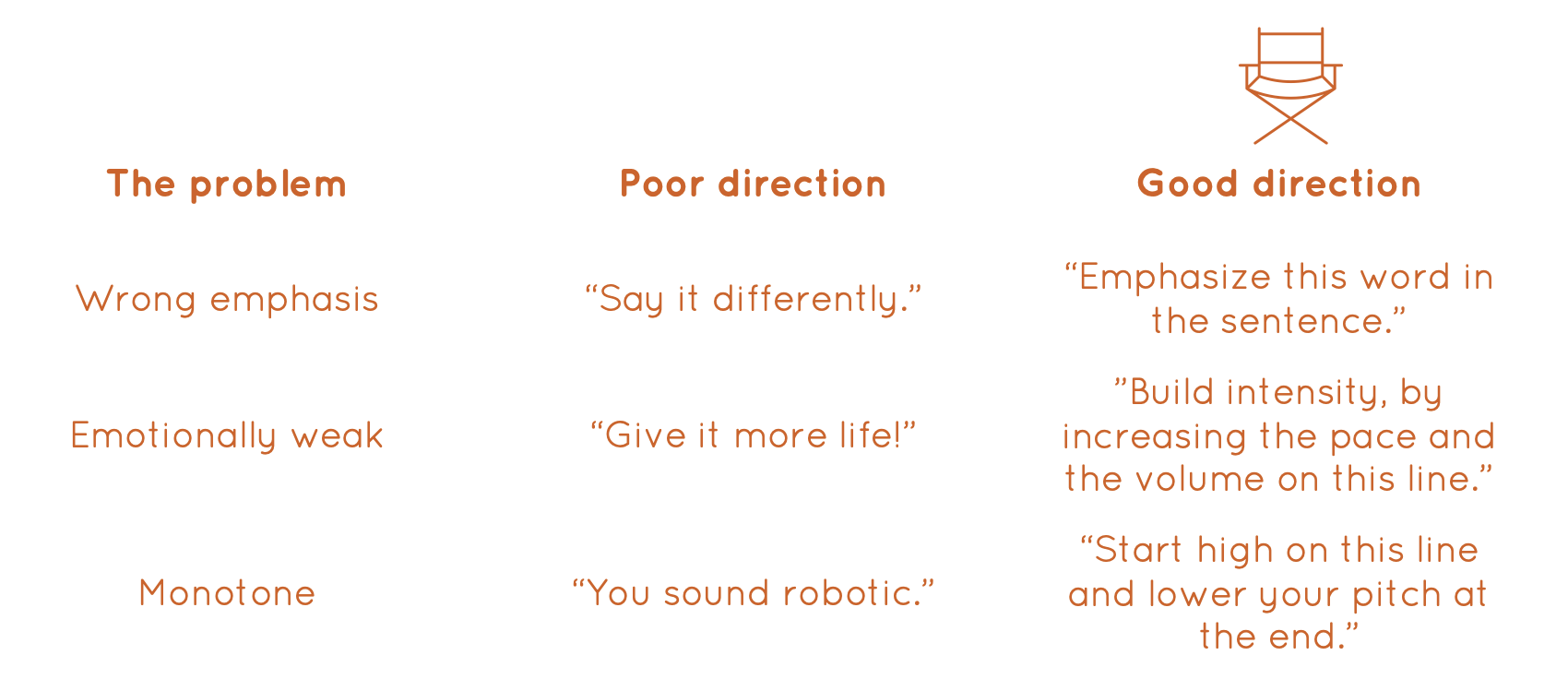
When you give the speaker direction, here is a simple guide for giving that feed back.
3 - Divide the video into smaller clips
There are couple reasons for this.
Vyond can only handle 100MB of uploaded video footage. Plus, it's much easier to work with smaller clips inside of Vyond. Upload each clip individually to Vyond. If it's a two-minute video, usually dividing into four 30-second clips works well. If you upload the video and audio separately, even better.
4 - Insert Vyond assets
The speaker is staring at a camera for 1-2 minutes talking. Boring! But you can enhance the video in a few ways:
Overlay words or phrases that emphasize the message.
Insert Vyond assets, such as icons, that represent an idea or action.
Overlay other uploaded company-specific assets that reinforce the message.
Cut away to B-Roll. Yep, that means that you either move the video off of the scene (but keep it playing so audio can be heard) or play only the audio track (if you are able to upload the video and audio separately). Make sure the B-Roll is laser-focused on showing the action of the message. Don't insert random stuff just because it's pretty.
The video below displays all of these techniques, plus the speaker (me) interacting with a Vyond character (Rance 2). Notice that the B-Roll demonstrates action and shows the viewer how they fit into the message.
What about AI-generated avatars?
The reality of most people's discomfort with "almost-human" characters is still prevalent.
Some producers are forced to use avatars. To limit the uncanny valley experience, make avatars a minor piece of the video. Keep them small. Never show them on a screen all by themselves. Whenever possible, cut away from the avatar to B-Roll.
How to start transforming talking heads
Start small, especially if stakeholders are wary of messing with their videos.
Add one or two appropriate assets to the video that anchor the message. Viewers will appreciate the help. As stakeholders grow comfortable with your expertise, you may ask if you could transform their talking heads into fully animated versions of the speaker, which opens up your options immensely!
Master Vyond
Take the first of three levels of Vyond training: Vyond Story Production to get started.